Schedule it. Staff it. Prove it.
Job and cleaner management, dressed up for the night. Sign up by 31 October and Pro is free until 1 January: schedules, compliance, photo checks and invoices, no tricks.
Comes in from anywhere
Sorted onto one schedule
Mon


Tue

Wed
Thu
Fri
On the right phone
SarahDanielGracePlans change?
Drag the job.
Booking calendars fill the schedule.
Paste a property's Airbnb, Booking.com or Vrbo calendar link once. Every booking becomes a clean on the checkout day, cancellations drop off and same-day turnovers are flagged. RoomZoom checks every hour. More on calendar sync.
Your team gets every job on their phone.
Their day in order with a suggested route, key-safe codes and property notes, clocking in and out as they go. Time off and training sit in the same app, and nothing needs downloading. More on the cleaner app.
Photos of every room, checked by AI.
Cleaners photograph rooms before and after at random cleans. Each room gets a score out of 100 against your checklist, and damage between two cleans becomes a report with photos and a timeline, ready for your client or a claim. More on photo checks.
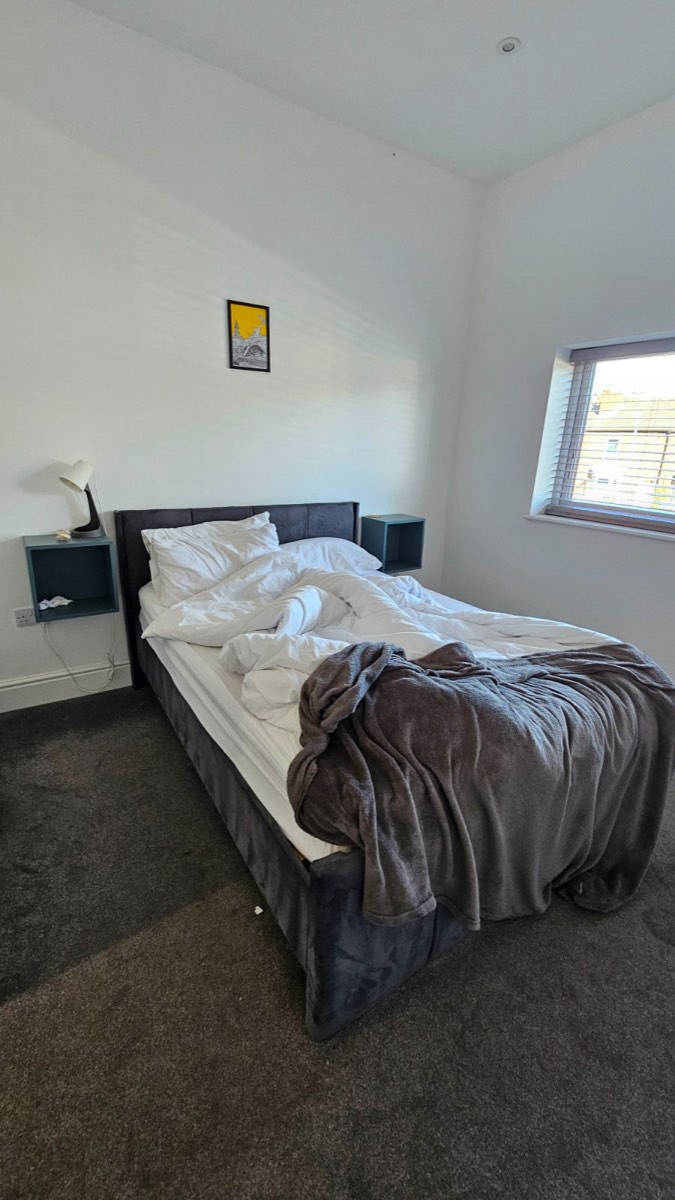
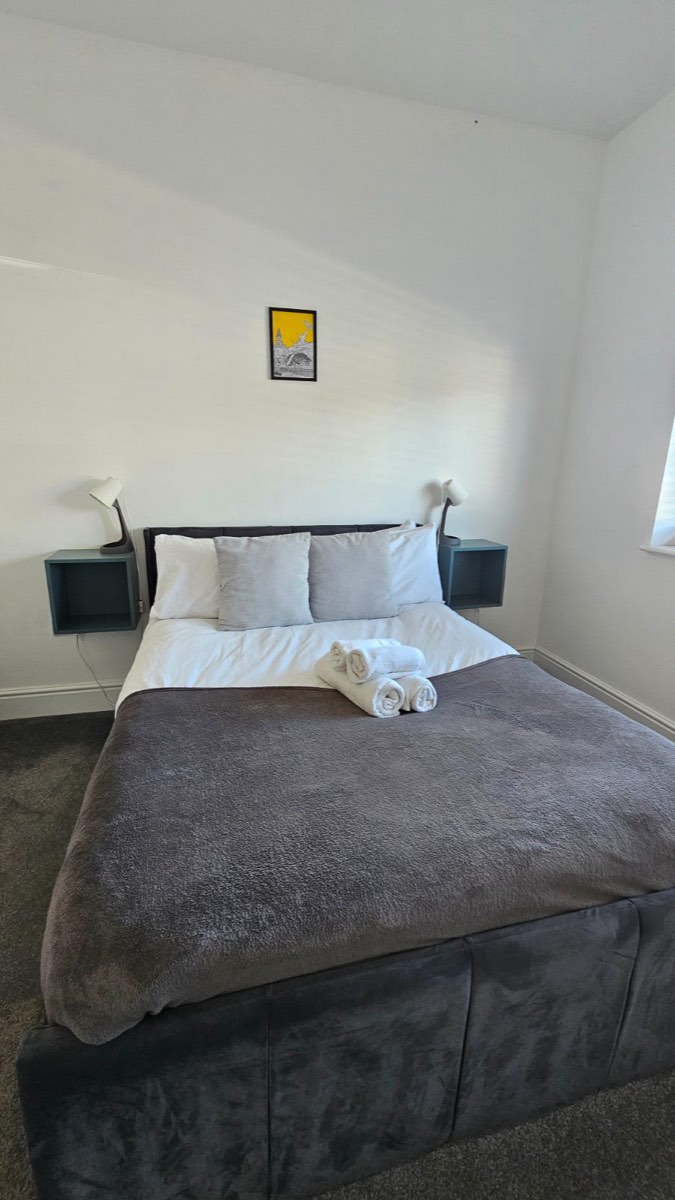
- Done well: Bed is made with clean white linen and a neat grey throw
- Done well: Rolled towels are placed neatly as a finishing touch
- Done well: Floor is clear of rubbish and guest items
- Missed: Duvet cover/white linen has a few minor creases near the pillows
- Missed: Cable from the left-hand bedside lamp hangs loose down the wall
Real photos from cleaners' checks, with the findings RoomZoom's AI gave each one.
Every route on one map.
See each person's day on the roads, from home to every job, and move a visit to another day or another person when plans change. More on scheduling.
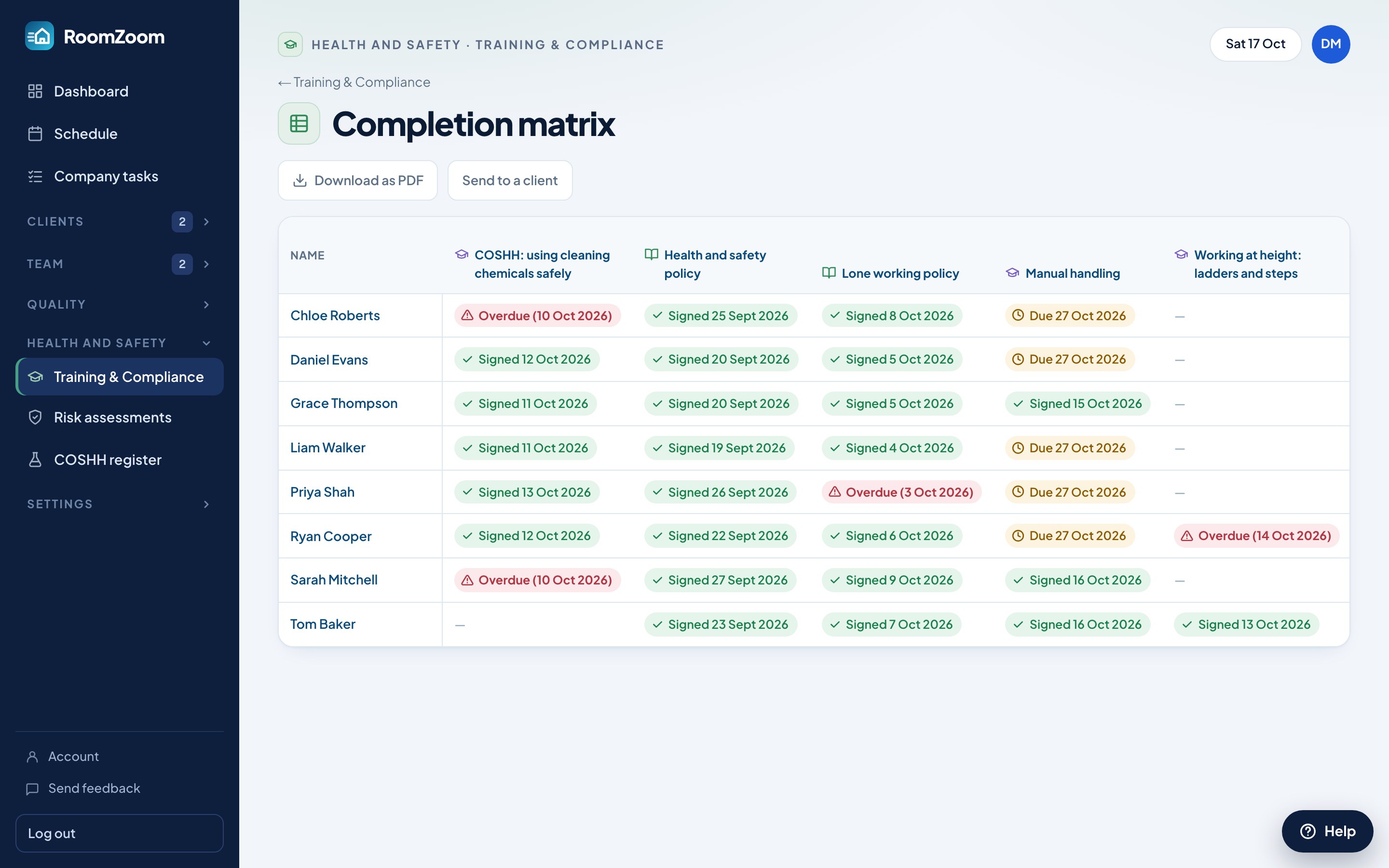
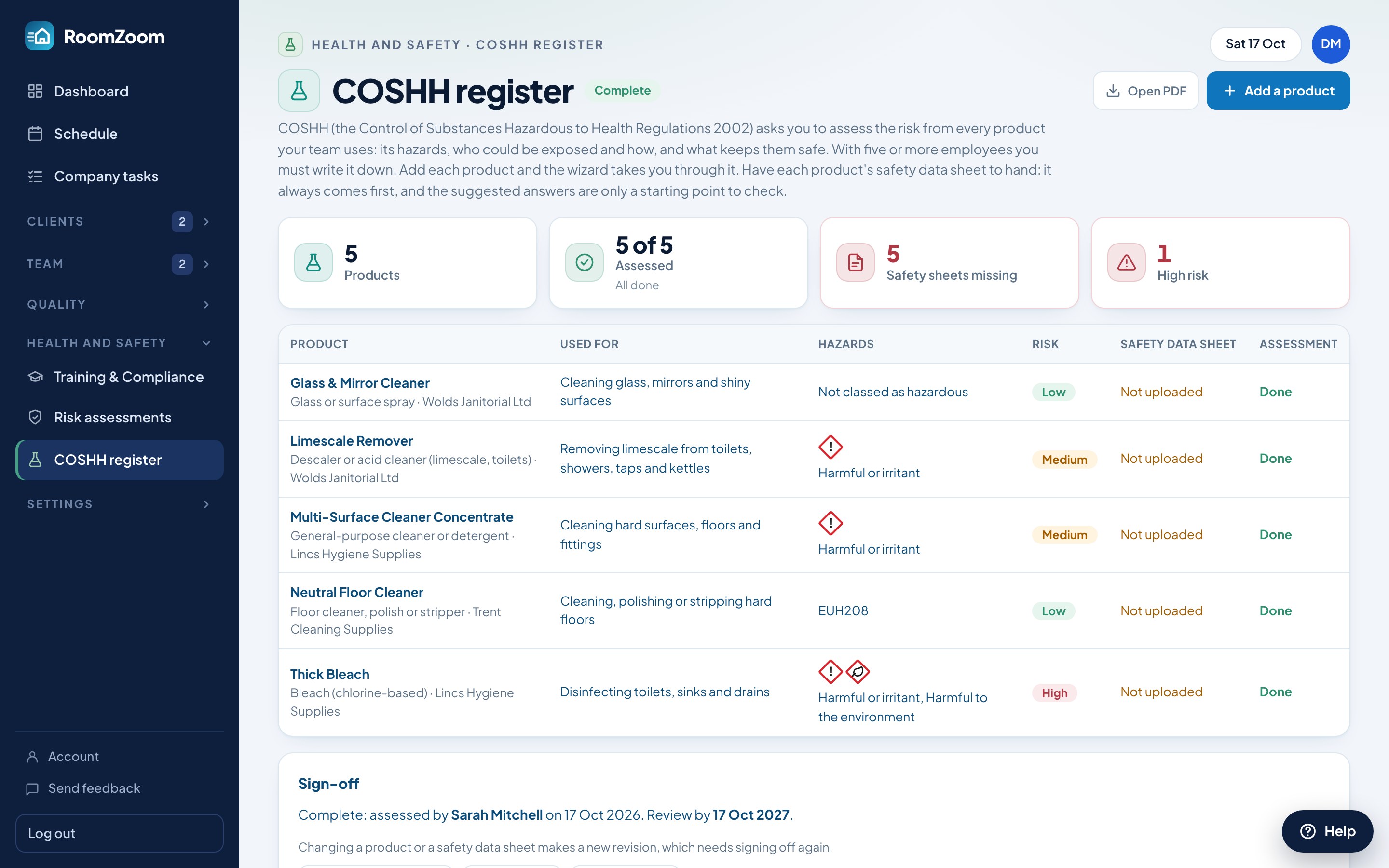
Policies, RAMS and COSHH, done.
Send your team policies and training to sign on their phones and see who has signed in a matrix. Write risk assessments and method statements for a job, and keep a COSHH register with the hazard symbols for every product. More on training records.
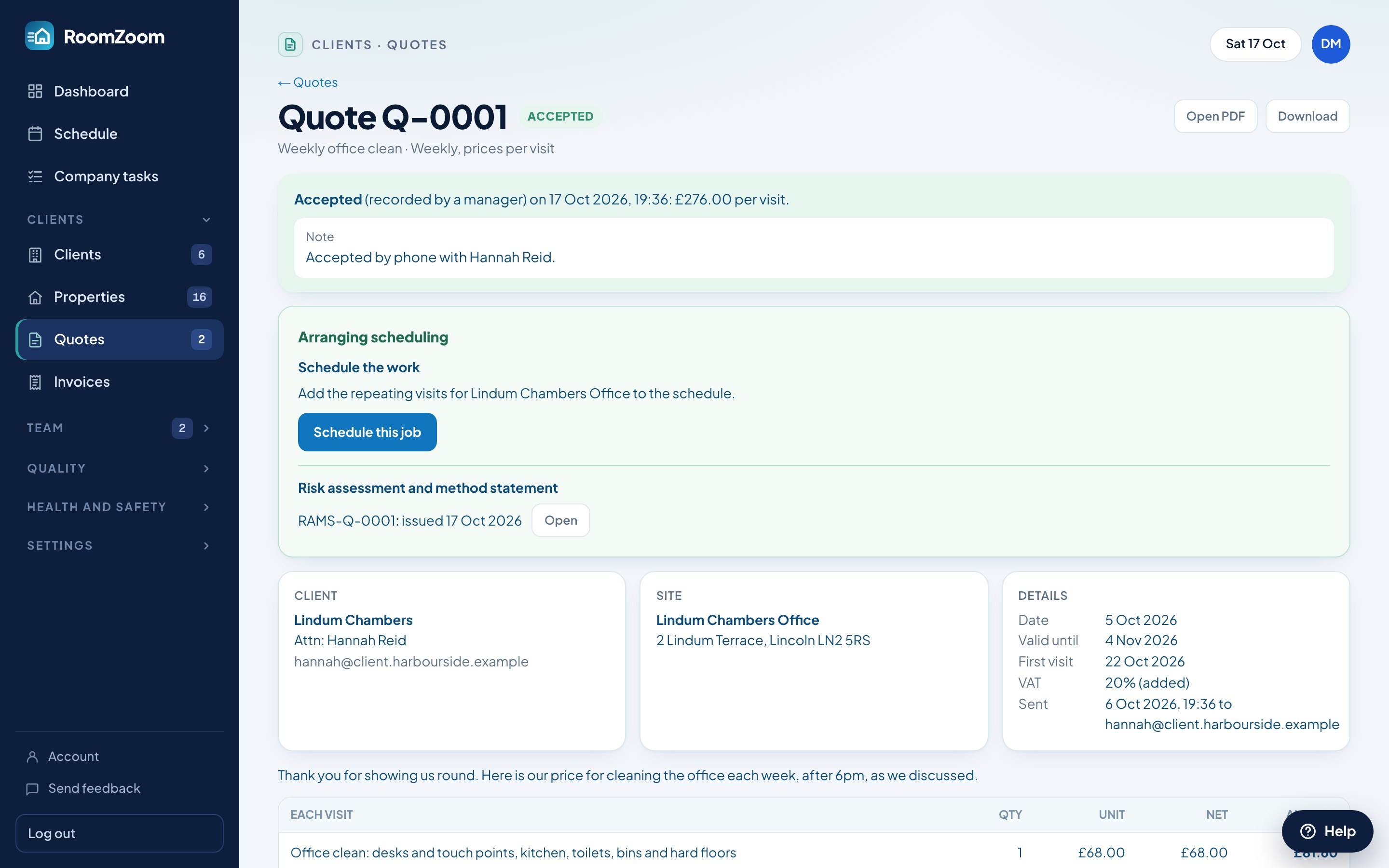
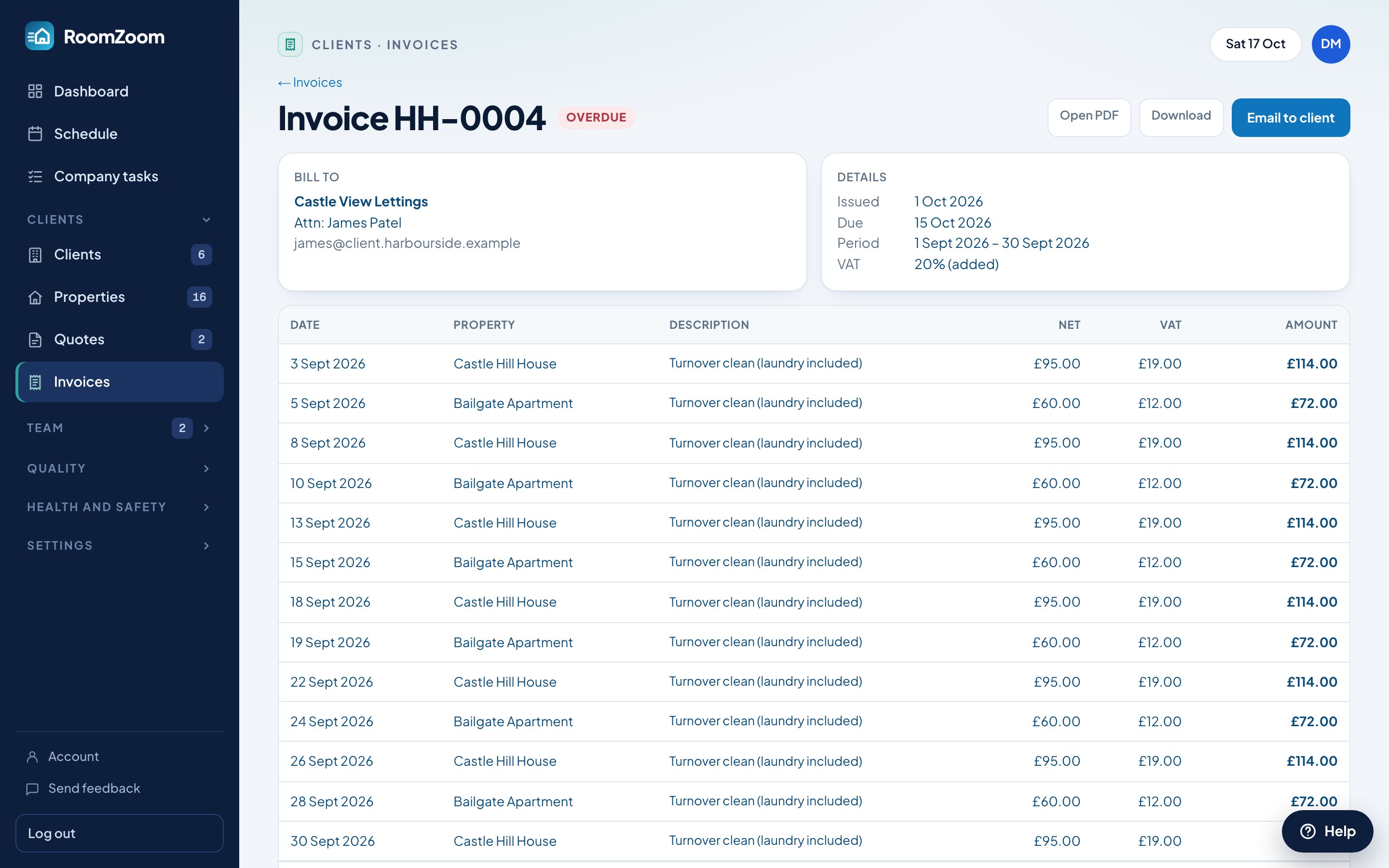
Quotes become jobs, then invoices.
Quote a new client with optional extras they can tick. When they accept online, add a risk assessment and schedule the work, then invoice the month from the visits that were actually done, with VAT and your own numbering. More on invoicing.
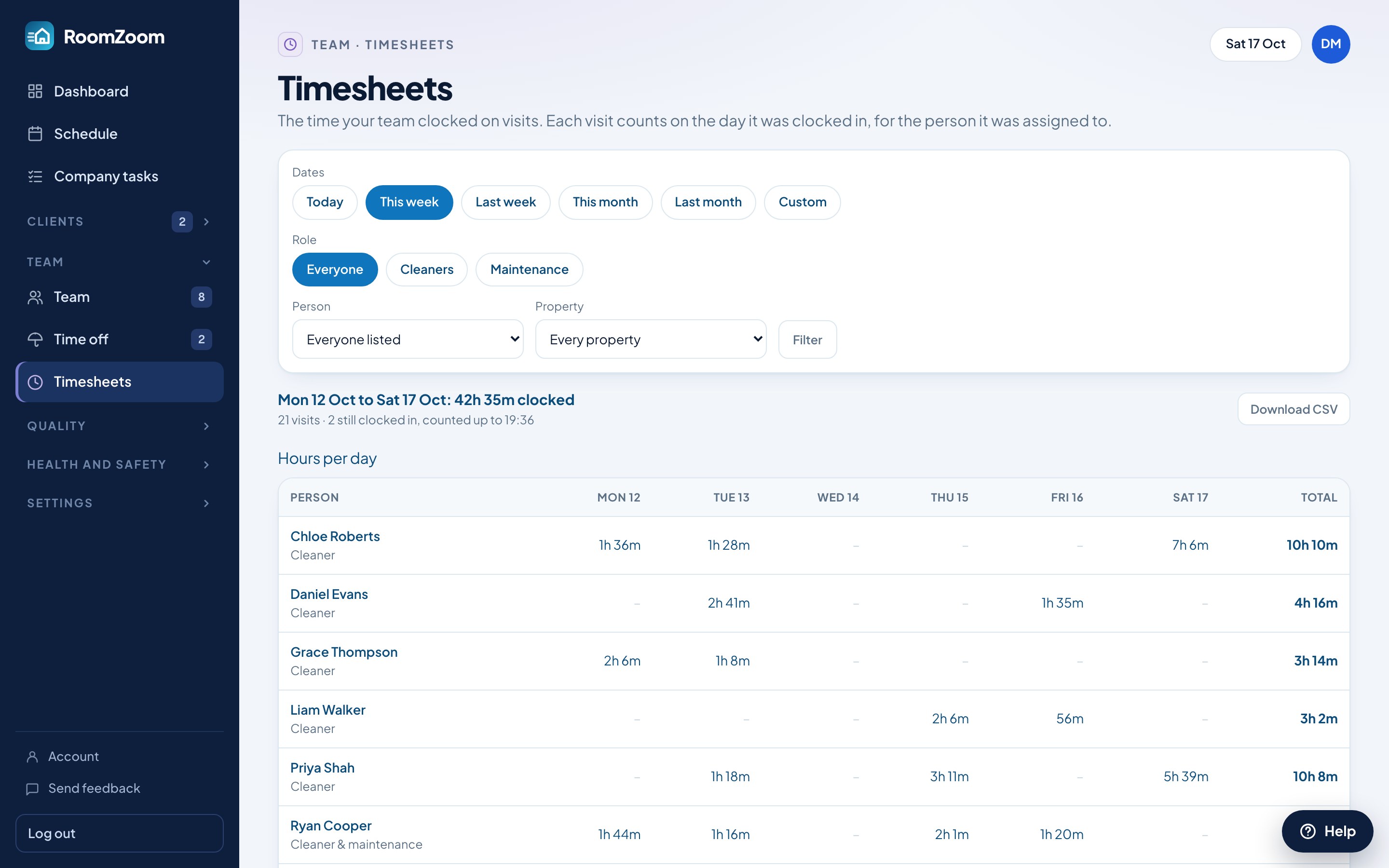
Timesheets and time off, sorted.
Clock-ins become timesheets you can check and export for payroll. Your team asks for time off from their phone, and you see which jobs it affects and hand each one to someone else. More on running your team.
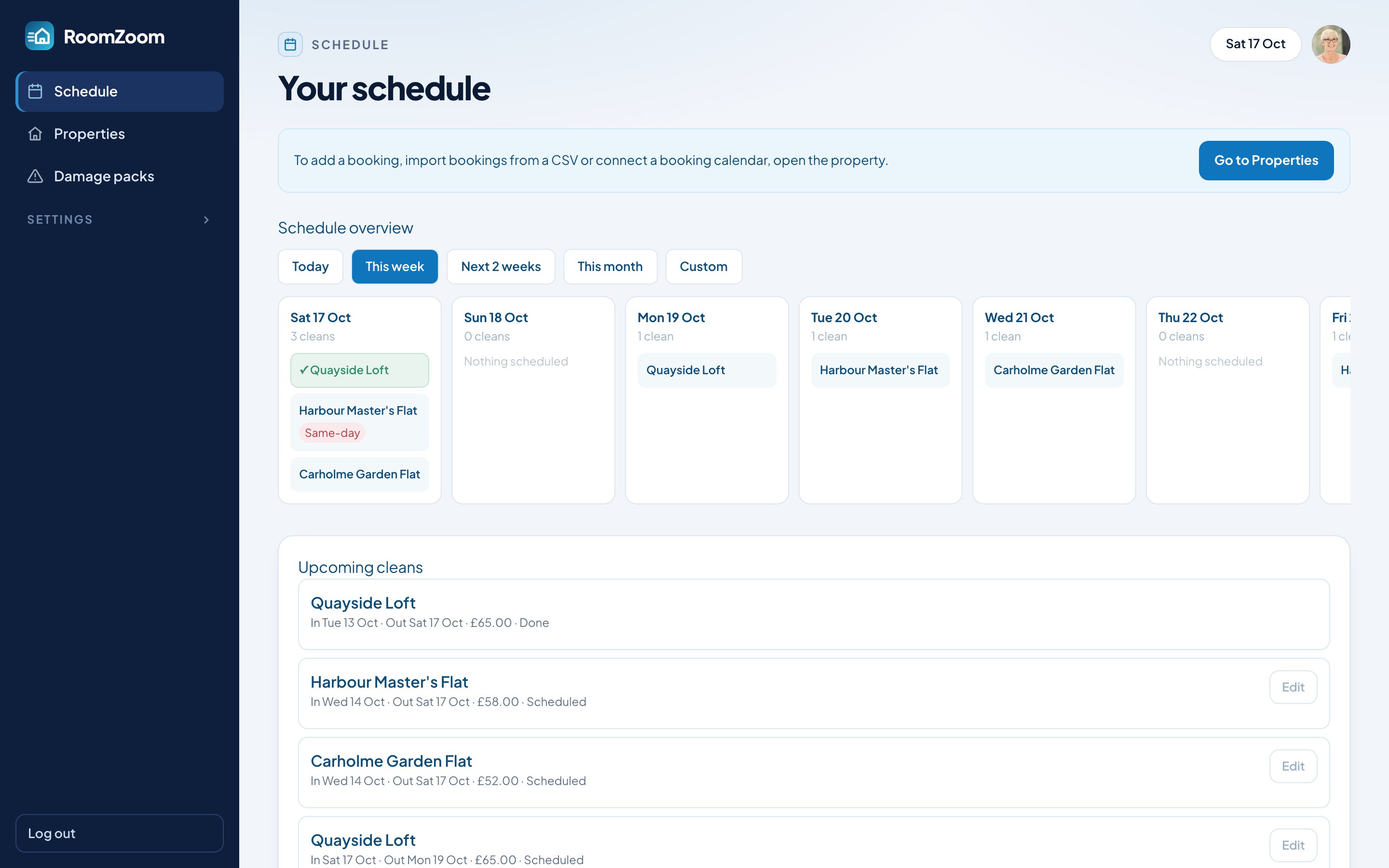
Clients see their own cleans.
Owners, hosts and offices get their own login to see upcoming and finished cleans, add stays, connect their calendars and see photos if you choose. Fewer “is it done yet?” messages. More for property managers.
“If you're cleaning short-term lets and struggling with admin all over the place, I'd 100% recommend giving this a try. It will change your business.”
Free to start.
Pro from $3.50
Per property, per month. Sign up by 31 October and Pro is free until 1 January.
| Basic$0, for as long as you like | Profrom $3.50 a property a month | |
|---|---|---|
| Properties, clients and team | Up to 5, 5 and 2 | No limits |
| Scheduling | ||
| One schedule for short lets, offices and homes | Included | Included |
| Drag jobs to another day | Included | Included |
| Repeating and one-off cleans, maintenance jobs | Included | Included |
| Booking calendar sync: Airbnb, Booking.com, Vrbo, any iCal link | Not included | Included |
| Suggested routes and the route map | Not included | Included |
| Your team | ||
| Cleaner app: jobs, property notes, clock in and out | Included | Included |
| Team colours and profile photos | Included | Included |
| Timesheets for payroll | Not included | Included |
| Time off, with cover sorted | Not included | Included |
| Health and safety | ||
| COSHH register with hazard symbols | Included | Included |
| Policies and training, signed on phones | Not included | Included |
| Risk assessments and method statements (with quotes) | Not included | Included |
| Clients and money | ||
| Client logins | Included | Included |
| Invoice export as CSV | Included | Included |
| Quotes clients accept online | Not included | Included |
| Numbered invoices with VAT, emailed as PDFs | Not included | Included |
| Checks and records | ||
| AI photo checks | Not included | Included |
| Damage checks | Not included | Included |
| Dashboard insights | Not included | Included |
| Company tasks | Included | Included |
| Repeating tasks and reminders | Not included | Included |
| Audit log | Not included | Included |
| Built-in help assistant | Included | Included |
| Notices | Not included | Included |
How Pro is priced
| First 20 properties | $5.50 each |
| Next 30 (21–50) | $5 each |
| Next 30 (51–80) | $4 each |
| Every property after 80 | $3.50 each |
A property a month, in bands like tax, so your bill only goes up gradually. No monthly minimum. Pay annually and get 2 months free.
20 × $5.50 per month · $5.50 per property on average.
Questions, answered.
Is it only for short lets?
No. Short lets from booking calendars, regular home cleans, offices, end of tenancy and maintenance jobs all sit on the same schedule, each with its own repeating pattern or one-off date, and go to the same app on your team's phones.
Which booking calendars does it work with?
Anything that gives an iCal calendar link, including Airbnb, Booking.com and Vrbo. Each property can have up to three calendars, for places listed on more than one site. RoomZoom checks them every hour.
What about health and safety?
Send your team policies and training to read and sign on their phones, see who has signed in a training matrix, write risk assessments and method statements (RAMS) for a job, and keep a COSHH register of your products with their hazard symbols.
Where does the AI come in?
Three places. Photo checks: AI scores cleaners' photos against your checklist and spots damage between cleans. Dashboard insights: AI reads your own figures for the day and suggests what to look at. And a help assistant on every manager page that answers how-to questions about RoomZoom. The AI never changes anything in your account.
Do my cleaners need to download an app?
No download needed. RoomZoom runs in the phone's browser: they sign in with the login you create for them, see their jobs, clock in and out and take photos when asked.
Do I need a card to sign up?
No. Sign up with your company details, confirm your email and you're in. RoomZoom is free on the Basic plan for as long as you like, and you only pay if you choose Pro.
Is my company's data kept separate?
Yes. Every company's data is isolated from every other at the database level, and only people you give a login can see it.
How is the price worked out?
Pro is priced per property, in bands, like tax: your first 20 properties are $5.50 each a month, the next 30 are $5 each, the next 30 are $4 each, and every property after 80 is $3.50. So 10 properties is $55 a month, 40 is $210 (20 × $5.50 + 20 × $5) and 100 is $450. Your bill only ever goes up gradually as you grow. There's no monthly minimum, and paying annually gets you 2 months free. Basic is free.
What's the difference between Basic and Pro?
Basic is free and covers up to 5 properties, 5 clients and 2 team members, with the schedule, repeating cleans, maintenance jobs, the cleaner app, client logins, the COSHH register and CSV invoice exporting. Pro has no limits and adds calendar sync, suggested routes and the route map, AI photo checks, damage checks, training and policies, quotes and risk assessments, invoices, timesheets, time off, dashboard insights and the audit log. The table in the pricing section shows them side by side.
Can I bring my existing bookings?
Yes. Connect calendars and upcoming bookings appear automatically, or import cleans from a spreadsheet using the CSV template.
No tricks.
Pro for free.
Sign up by midnight on 31 October and Pro is free until 1 January. No card needed.